Pages

Showing posts with label Instagram. Show all posts

Saturday, February 15, 2014

TECH: How To Save Instagram Photos On Android and iOS Easily

Ever wanted to save a friend's picture you just liked on Instagram to either your Android or iOS-powered smartphone and you just couldn't do it?

Well, here comes InstaSave, a third-party application for Instagram that allows Instagram users to download their own pictures and pictures they've liked regardless of the poster's following status.

HOW TO USE INSTASAVE
1. Download InstaSave for Android here: https://play.google.com/store/apps/details?id=bml.prods.instasave
    Downloas InstaSave for iOS here: https://itunes.apple.com/us/app/instasave-for-instagram/id777143884?mt=8

2. The way to download is actually very easy. The Interface of the application shows two buttons: One button to download your own pictures and the other to download pictures you've saved.

InstaSave-For-Instagram-9janinja-tech


3.  Clicking on one of these pictures will bring a list of thumbnails of the required photos. Select whichever one(s) you want to download and click on Save!.
InstaSave-For-Instagram-9janinja-tech


InstaSave-For-Instagram-9janinja-tech
Screenshots Of InstaSave

VERDICT: Totally cool app that does what it advertises. LogIn to Instagram might freeze occasionally but is nothing to worry about. Rating: 8/10

Friday, December 13, 2013

TECH: Instagram Introduces The Direct Photo And Video Message Feature


Instagram, the leading photo and short video service owned by Facebook yesterday announced a new feature for its iOS and Android devices apps. 

The new feature allows a user to send to send a direct message or video to another user who is following is following him/her. If the receiver isn't following the sender, the message goes to a request queue which the receiver can choose to accept or not.


How To Use Instagram Direct


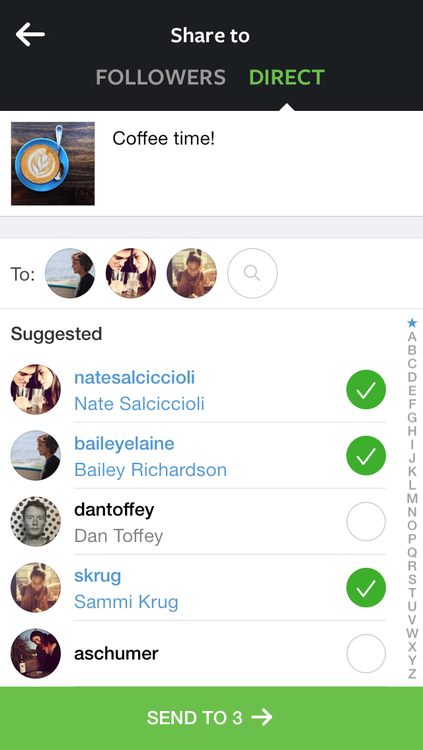
Instagram Direct lets you send a photo or video to a select group of people. Posts won’t appear in feed, search or your profile.
To send photos/videos with Instagram Direct:
  1. Take a new photo/video or upload a photo/video from your camera roll.
  2. Add optional effects, filters and a caption.
  3. Tap Direct. You’ll see some features appear in green when you’re using Instagram Direct.
  4. Tap the names of people you want to send the photo/video to (up to 15 people).
  5. Tap Send.
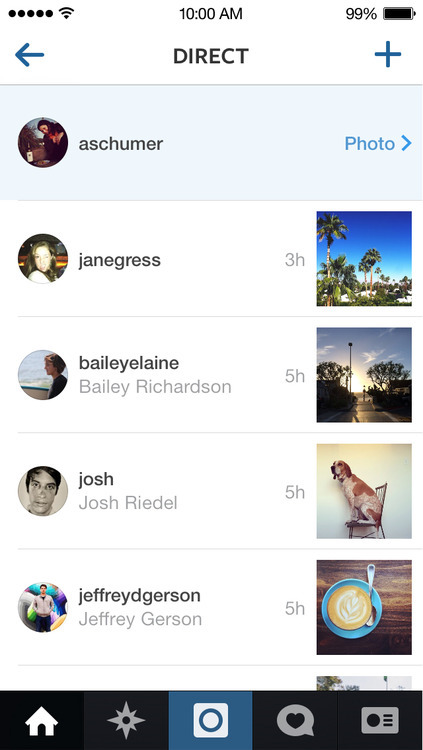
The people you've sent the post to will get a notification. To see posts you've sent with Instagram Direct, tap  in the top right of your Home feed.
Posts sent with Instagram Direct can't be shared through Instagram to other sites like Facebook or Twitter. You also can't tag people or use hashtags in these shared posts.


NOTE: You need to update your Instagram App On Google Play (for Android) and Apple's App Store (for iOS) to use this feature.

VERDICT: This feature is highly useful when you need to send photos and videos that are not for the public's eyes. 

Follow the writer @CodedTee
To add the writer to your circles, please Click Here

For more on 9N's Technology, please Click Here

Wednesday, December 4, 2013

PHOTO OF THE DAY: The Wrong Use Of Instagram Effects

We all know how cool Instagram effects are. It can make a totally ugly person (like me) look like a superstar. It can also deceive you into thinking someone is super pretty or handsome.

Well, in the picture below, it actually turned the lady into a green goblin...


CLICK HERE to follow us on Google+ so as to get instant updates on published posts.

Subscribe to our BBM Channel (C004F0A3F or search for "9ja Ninja") to get live updates on published post.

Please drop your comments below.

Thursday, November 21, 2013

TECH: Instagram Coming To Windows Phone Crippled Without Many Features


First announced last month at Nokia’s Lumia event, Instagram for Windows Phone is finally here. You can download it from the Windows Phone app starting at 11AM PT on Wednesday.

It’s been a long time coming, and Windows Phone photographers will no doubt be overjoyed they no longer have to rely on third-party apps to get their selfie fix. Unfortunately, this version seems more like Instagram-lite. You can’t use the app itself to take pictures, you can’t tag people in photos, and you can’t upload video. It also only works with Windows Phone 8, so Windows Phone 7 users are out of luck. I’m curious as to why the app is being released in this stage of seemingly half-completion.

While iOS and Android are each home to over one million apps, Microsoft’s most recent number for Windows Phone pit it around the 170,000 mark. I’m not sure if the arrival big-name Instagram in this crippled form is a step forward or backward.

Instagram says the release is a beta, and that more features are to come soon, so at least there’s some hope on the horizon. But for now, this is a little bittersweet for Windows Phone users.

-GigaOm

Tuesday, October 22, 2013

TECH: How To Download Instagram Photos On PC


Ever wondered if you will be able to download Instagram pictures from someone's account or download all the pictures you've uploaded there? Here comes Free Instagram Downloader for your PC.

Now to download Instagram pictures, all you need is the username whose pictures you will like download.

Steps:

1. Download Free Instagram Downloader HERE

2. Install on your PC.


3. After installation of the application, launch from your desktop. Input the username whose pictures you want to download (as seen in the screenshot below).


4. Only the public pictures of the user will be shown. To show private pictures, you must login and make sure that the username whose pictures you want to download is been followed.


You can then select pictures you wish to download as seen in the screenshot above. Enjoy downloading.

Follow the writer @CodedTee

TOP POST YESTERDAY